 0 Comments

Apply for an urgent Dubai visa but don't know how to check the visa status? If the answer is yes, then you don’t need to panic. You can check UAE visa status by passport on official portals, including ICP smart service portal and the GDRFA portal. The visa status shows the current status of your visa approval process from the authority's side.
If you are applying for a Dubai visa for the first time as a tourist, a family visa for Dubai, or other visas, and don't know how to track the visa status. Then this guide will help you quickly. Through this guide, we will cover in depth how to UAE Visa Status check by passport number online at home. Also, we will cover related important terms.
ICP portal is also known as the “Federal Authority for Identity, Citizenship, Customs and Port Security”. It offers multiple options, including passport services in the UAE.
Visa Status Check UAE: You can check the visa status of Emirates countries such as Abu Dhabi, Sharjah, Ajman, Umm Al Quwain, Ras Al Khaimah, and Fujairah. You have to visit the official portal and follow the steps given below to UAE visa check by passport number shortly:
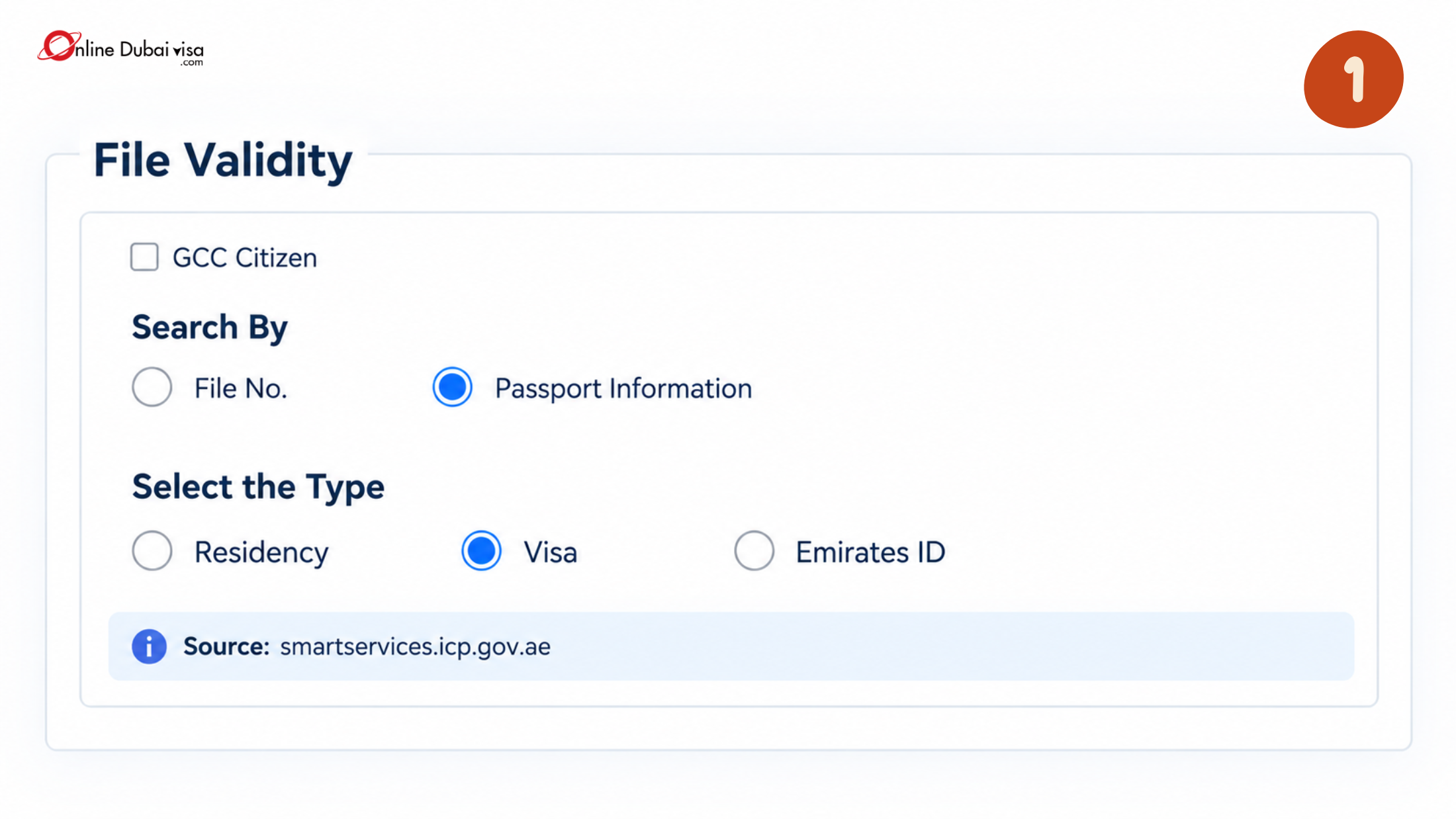
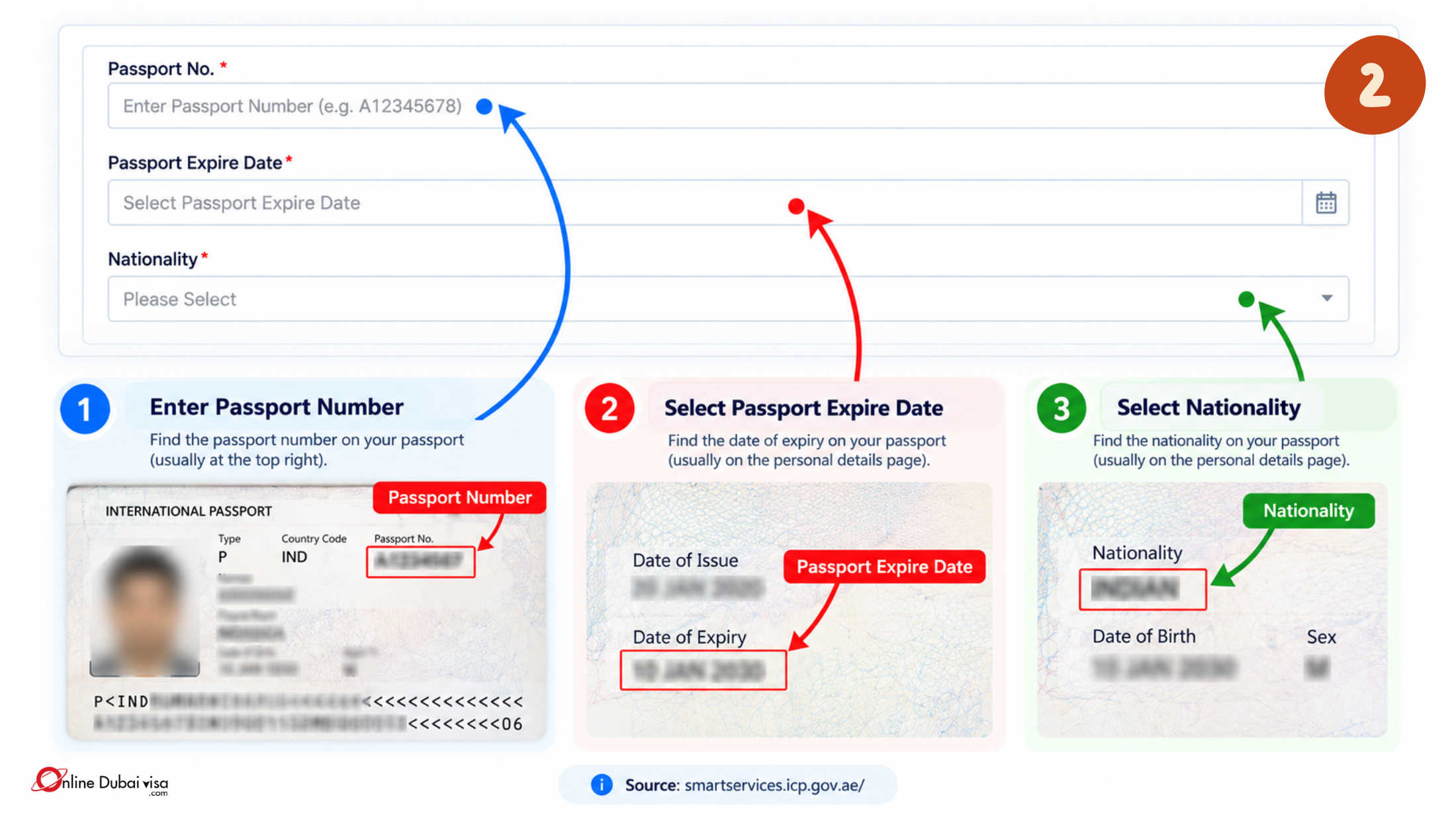
Step 1: Visit the official ICP Smart Service Portal. and Select the search option as “Passport Information” and search type “Visa”.
Step 2: Enter your Passport Number, Expire Date and Nationality.
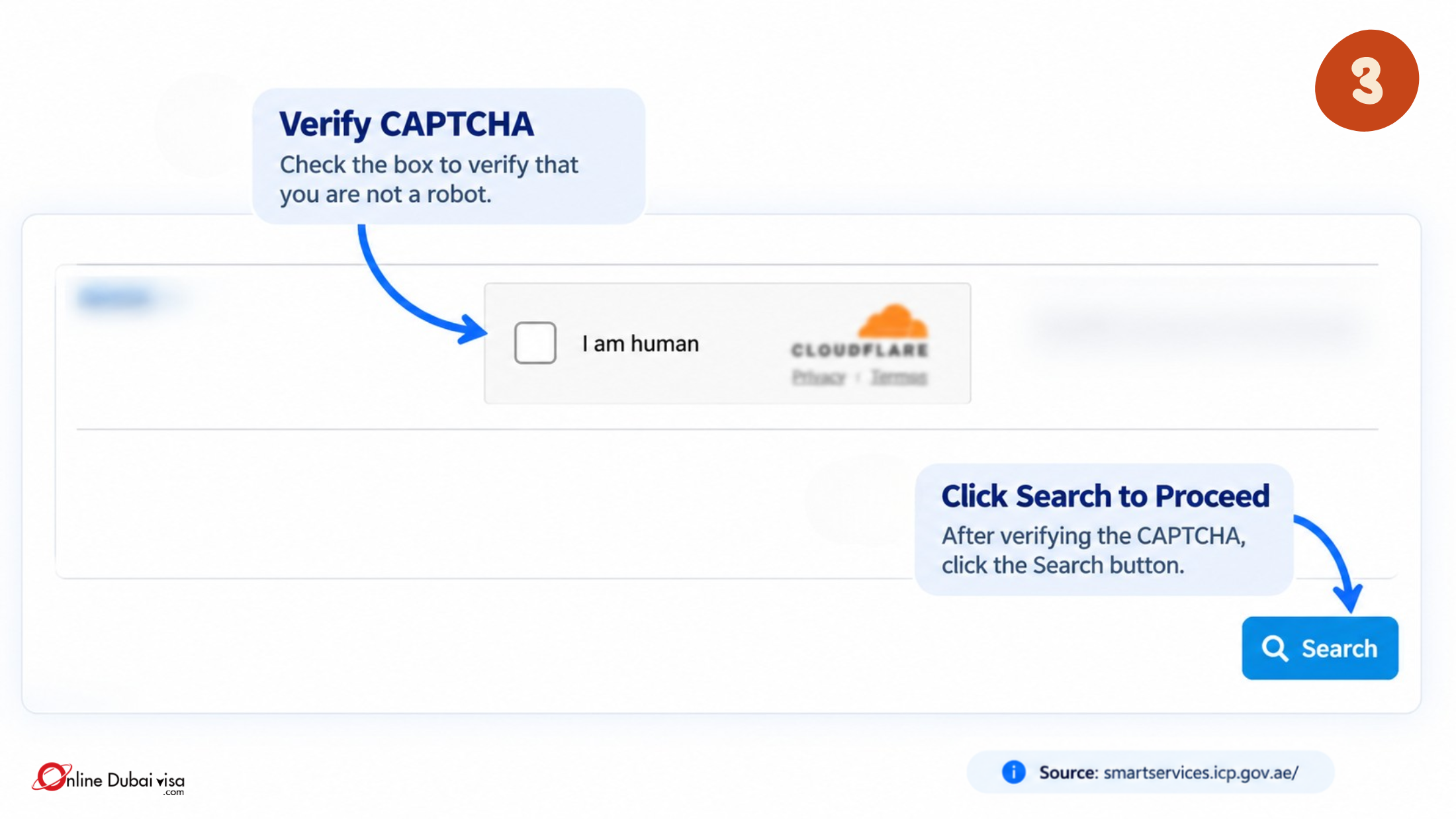
Step 3: Complete the CAPTCHA verification for security purposes and click on Search.
GDRFA also refers to the “General Directorate of Residency and Foreigners Affairs”. It is the UAE official government immigration portal that provides different kinds of services, including Visa status check UAE, immigration, entry permits and others.
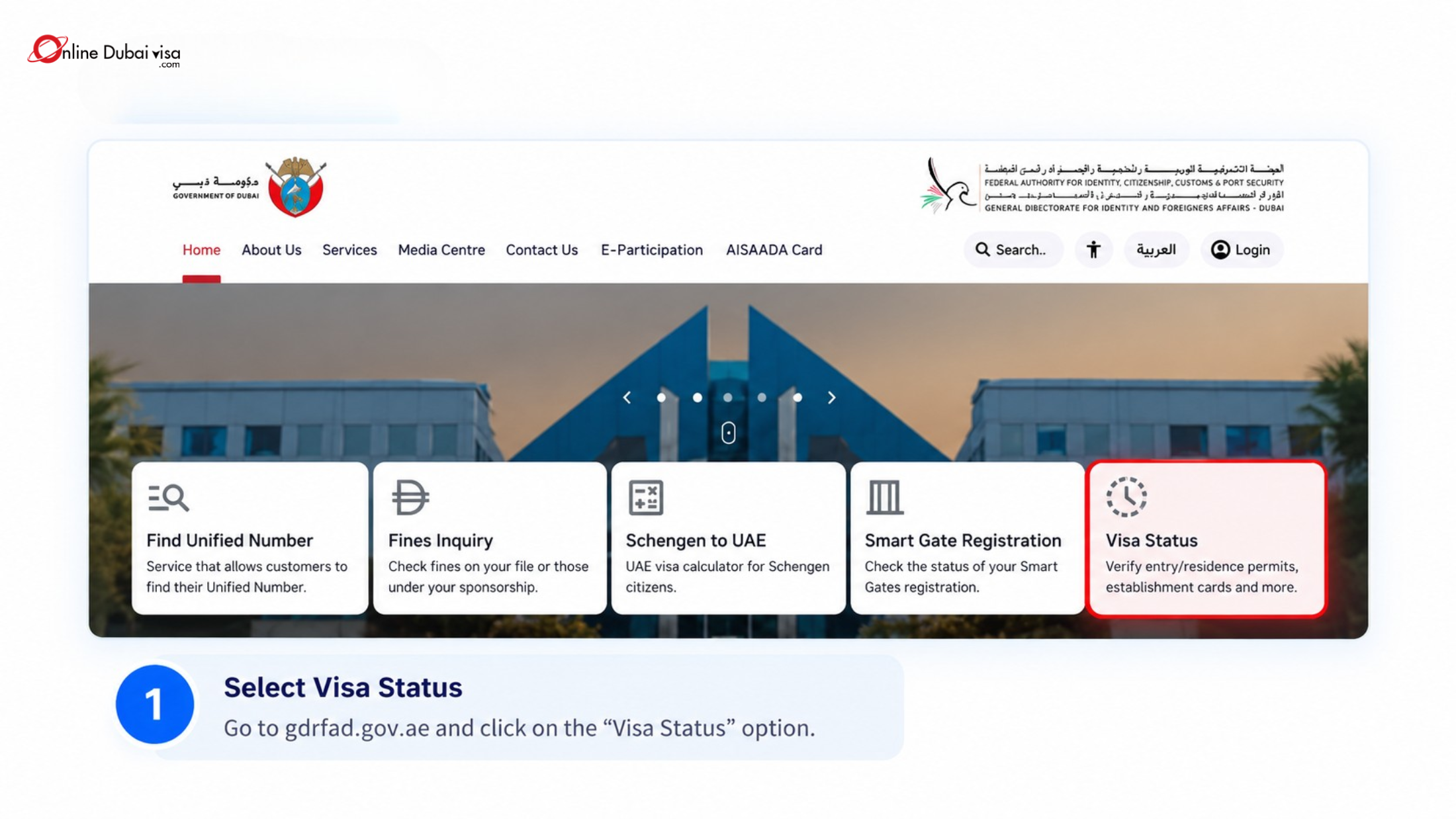
Step 1: Visit the official website gdrfad.gov.ae , and Choose the visa status.
Step 2: Select “Search to request”
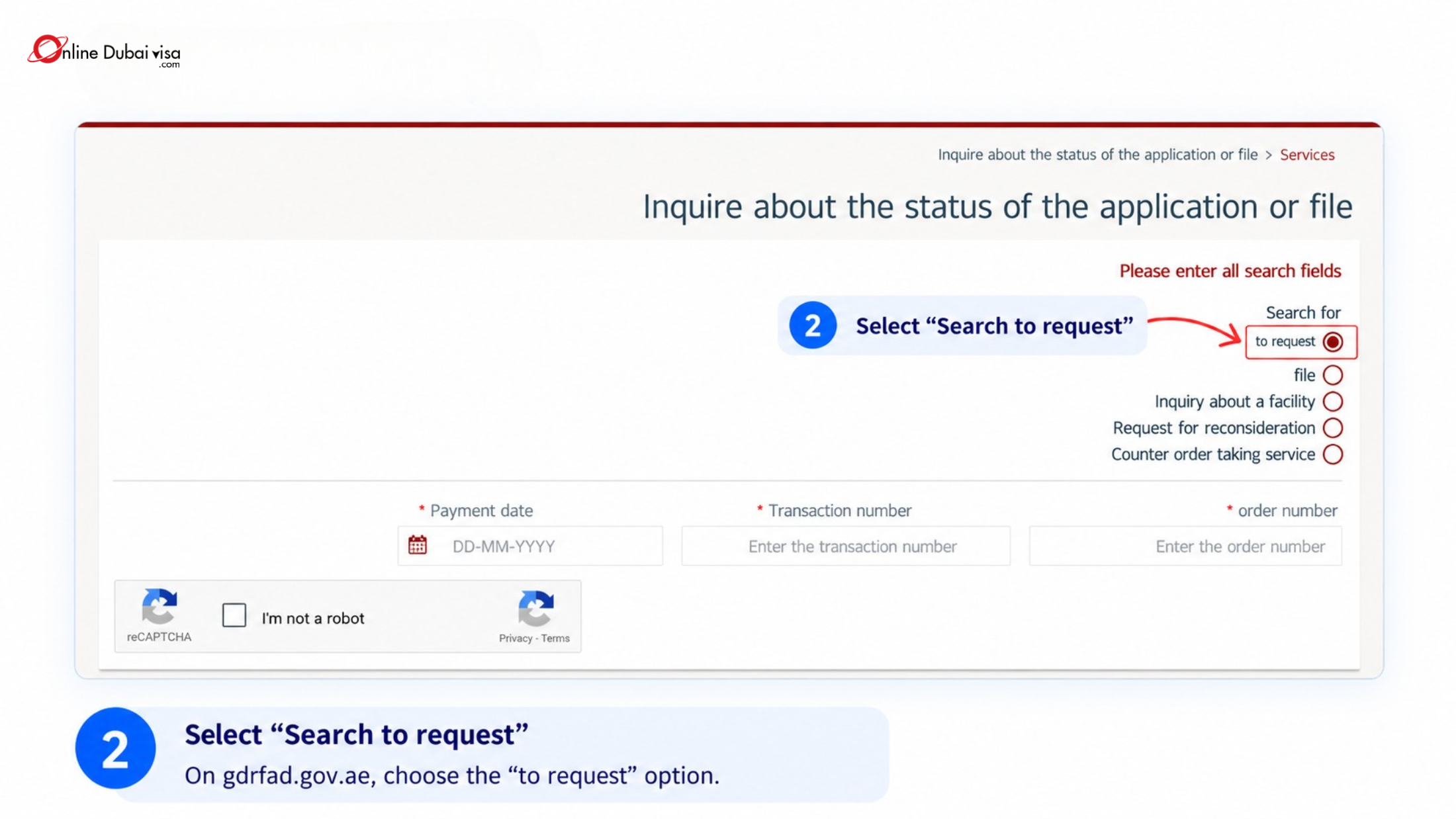
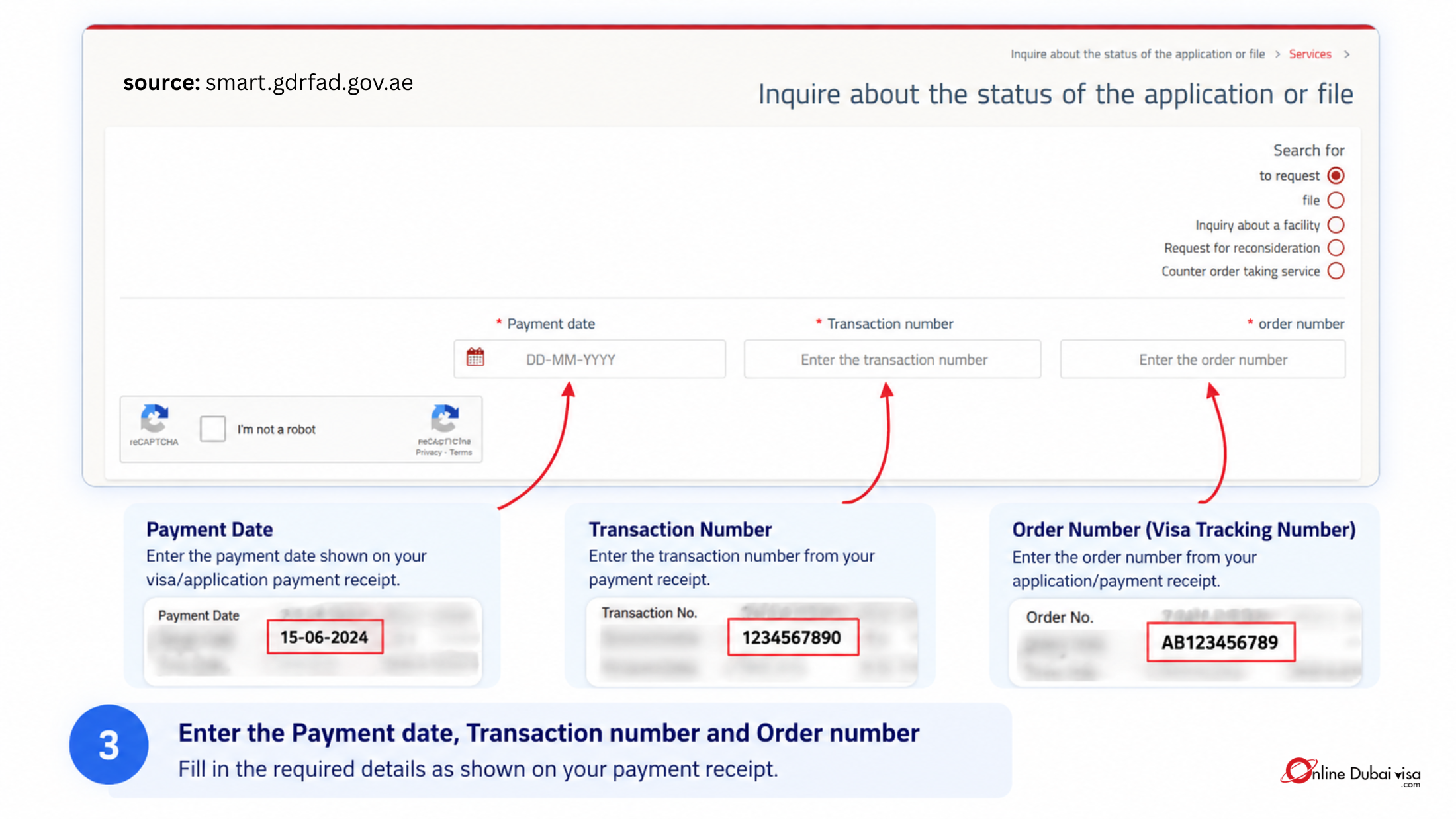
Step 3: Enter the Payment date, transaction number and order number (visa tracking number)
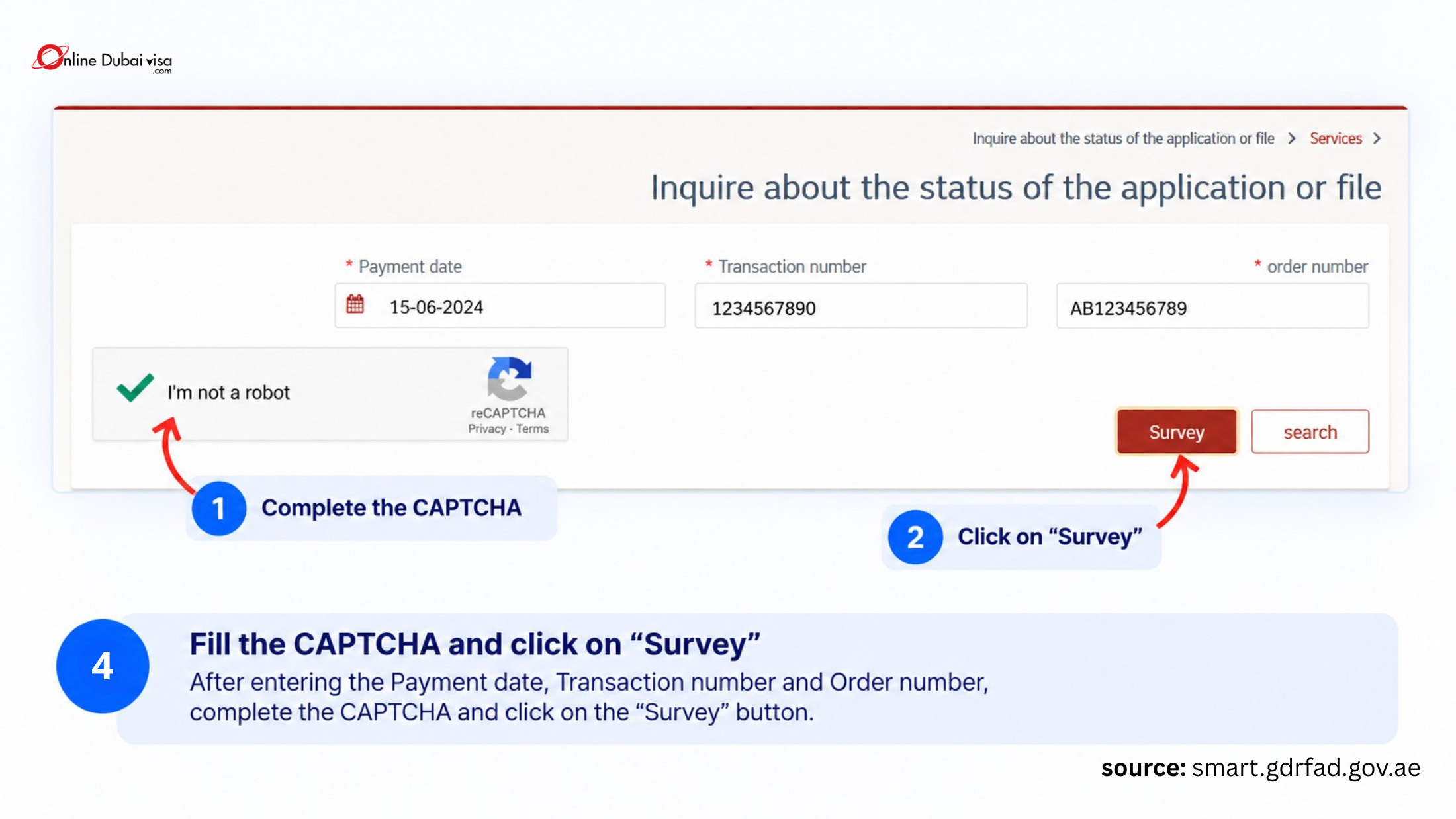
Step 4: Fill in the CAPTCHA for security purposes and Click on the Survey and check your current visa status.
Both the ICP Smart Services Portal and the GDRFA Portal are officially authorized by the UAE government. While both portals allow you to check your visa status, they cover different emirates. Depending on which emirate issued your visa, you will need to use a specific portal. Here are the key details outlined below:
| Visa/Location | Portal |
| Abu Dhabi | ICP Smart Service |
| Sharjah | ICP Smart Service |
| Ajman | ICP Smart Service |
| Umm Al Quwain | ICP Smart Service |
| Ras Al Khaimah | ICP Smart Service |
| Fujairah | ICP Smart Service |
| Dubai | GDRFA Dubai |
You can choose different methods for Abu Dhabi visa check, some of which are mentioned below:
| Status Type | Required Details | Where to Find It |
| A New Application (Pending Approval) |
|
Booking receipt or confirmation email from your airline, hotel, or travel agent. |
| An Issued Visa (Using File Number) |
|
Printed near the top of your eVisa PDF or on your physical passport visa sticker. |
| An Issued Visa (Using Passport Only) |
|
Located on your passport's primary photo page (no visa paperwork required). |
Once you track your current UAE visa status, you will see the different kinds of status. Some of them are outlined below in a table:
| Visa Status | Means |
| Under Process | Immigration is currently reviewing |
| Approved / Issued | Your visa is granted and ready to download. |
| Active | Your visa is valid and fully legal to use. |
| Used | You have already entered the UAE with this permit. |
| On Hold / Pending Documents | Paused. Immigration requires extra documents from you. |
| Cancelled | The visa is no longer valid (ended or switched). |
| Expired | Validity date has passed. Overstay fines apply inside the UAE. |
| Rejected / Denied | Application not approved |
| Under Cancellation | Sponsor has requested cancellation; processing is ongoing. |

Go to the official ICP Smart Services portal and click on "File Validity". Select "Passport Information", choose "Visa", and enter your passport details, expiration date, and nationality to view your status instantly.
To Dubai visa status check online, visit the GDRFA portal, select “To request”, and fill out the details, including the payment number, transaction number and tracking number.
Visit the official ICP smart service portal for Visa status check UAE, including all Emirates (Abu Dhabi, Sharjah, Ajman, Umm Al Quwain, Ras Al Khaimah, and Fujairah). Visit the official GDRFA website to check your Dubai Visa status online.
Yes, you can easily verify these details online. When you search your file using the ICP or GDRFA portals, the system displays your active status, exact issuance date, and final visa expiry date.
Yes, you can bypass those numbers completely. Both the official ICP and GDRFA portals feature a "Passport Information" search tab, allowing you to check status using only your passport number and nationality.
This usually happens due to three main reasons: you are using the wrong portal for your emirate, there is a typographical error in your passport digits, or your visa is linked to an older passport.
Yes, the portals are accessible globally. You can securely Dubai visa status check, validity, and entry-before dates from anywhere in the world by using the public web platforms or official government mobile apps.
First, verify your typing details on the portal. If errors persist, call the official ICP support helpline at +971-600522222, or reach out to the dedicated Dubai GDRFA Amer service centre at +971-43139999.
Yes, you can check the UAE visa status on Online Dubai Visa using your visa reference number in just one click.









www.onlinedubaivisa.com is a site operated by Travejar Tourism LLC, a travel agency registered in Dubai under number 1835447. Commercial License Number: 1115447 issued on Nov 9th 2022.